 Powerjett
React中的&、|、~
“&”运算符
“&”运算符(位与)用于对两个二进制操作数逐位进行比较,并根据下表所示的换算表返回结果。
| 第一个数的位值 | 第二个数的位值 | 运算结果 |
|---|---|---|
| 1 | 1 | 1 |
| 1 | 0 | 0 |
| 0 | 1 | 0 |
| 0 | 0 | 0 |
在位运算中,数值 1 表示 true,0 表示 false,反之亦然。
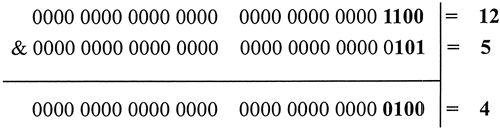
12 和 5 进行位与运算,则返回值为 4。
typescript
console.log(12 & 5); //返回值4
下图以算式的形式解析了 12 和 5 进行位与运算的过程。通过位与运算,只有第 3 位的值为全为 true,故返回 true,其他位均返回 false。
“|”运算符
“|”运算符(位或)用于对两个二进制操作数逐位进行比较,并根据如表格所示的换算表返回结果。
| 第一个数的位值 | 第二个数的位值 | 运算结果 |
|---|---|---|
| 1 | 1 | 1 |
| 1 | 0 | 1 |
| 0 | 1 | 1 |
| 0 | 0 | 0 |
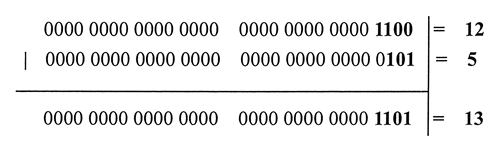
12 和 5 进行位或运算,则返回值为 13。
typescript
console.log(12 | 5); //返回值13下图以算式的形式解析了 12 和 5 进行位或运算的过程。通过位或运算,除第 2 位的值为 false 外,其他位均返回 true。
“~”运算符
“~”运算符(位非)用于对一个二进制操作数逐位进行取反操作。
- 第 1 步:把运算数转换为 32 位的二进制整数。
- 第 2 步:逐位进行取反操作。
- 第 3 步:把二进制反码转换为十进制浮点数。
非运算的真值表:
| a | NOT a |
|---|---|
| 0 | 1 |
| 1 | 0 |
对 12 进行位非运算,则返回值为 -13。
typescript
console.log( ~ 12 ); //返回值-13
下图以算式的形式解析了对 12 进行位非运算的过程。
shell
12 (base 10)  = 00000000000000000000000000001100 (base 2)
               --------------------------------
~12 (base 10) = 11111111111111111111111111110011 (base 2) = -13 (base 10)
位非运算实际上就是对数字进行取负运算,再减 1。例如:
typescript
console.log( ~ 12 == -12-1); //返回trueReact中SideEffect的设计
typescript
// Don't change these two values. They're used by React Dev Tools.
export const NoEffect = /*              */ 0b000000000000;
export const PerformedWork = /*         */ 0b000000000001; // 1

// You can change the rest (and add more).
export const Placement = /*             */ 0b000000000010; // 2
export const Update = /*                */ 0b000000000100; // 4
export const PlacementAndUpdate = /*    */ 0b000000000110; // 6
export const Deletion = /*              */ 0b000000001000; // 8
export const ContentReset = /*          */ 0b000000010000; // 16
export const Callback = /*              */ 0b000000100000; // 32
export const DidCapture = /*            */ 0b000001000000; // 63
export const Ref = /*                   */ 0b000010000000; // 128
export const Snapshot = /*              */ 0b000100000000; // 256
export const Passive = /*               */ 0b001000000000; // 512

// Passive & Update & Callback & Ref & Snapshot
export const LifecycleEffectMask = /*   */ 0b001110100100; // 932

// Union of all host effects
export const HostEffectMask = /*        */ 0b001111111111; // 1023

export const Incomplete = /*            */ 0b010000000000; // 1024
export const ShouldCapture = /*         */ 0b100000000000; // 2048
在源码中,随处可见的代码如下
typescript
workInProgress.effectTag |= PerformedWork一开始 effectTag是NoEffect, 经过 | 运算,变成了0b000000000001,如果再 |
typescript
workInProgress.effectTag |= Placement经过 | 运算,变成了0b000000000011,
这样,这个effectTag就具备了 Placement 和 PerformedWork的性质
比如判断当前是否具有Placement特性
typescript
workInProgress.effectTag & Placement === Placement即 0b000000000011 & 0b000000000010 结果是 0b000000000010